




Checklist for Choosing Cloud AI Platforms in Dentistry

AI in dentistry is growing, but only 35% of dentists have adopted it as of early 2026. If you’re considering this technology, here’s what you need to know to make an informed decision:
- Key Features: Look for platforms that analyse 2D/3D radiological images, automate tasks like cephalometric tracing, and integrate with practice management systems (PMS).
- Regulatory Compliance: In Australia, AI tools must be registered with the TGA and comply with the Privacy Act 1988 and APPs. Ensure patient data stays within Australian borders.
- Clinical Performance: Request independent validation of metrics like accuracy and specificity. Avoid relying solely on vendor claims.
- Data Security: Verify encryption standards (AES-256 for stored data, TLS 1.2+ for data in transit) and ensure the vendor has a Data Processing Agreement.
- Usability: Ensure seamless PMS integration to save time and reduce manual data entry. Ask for a demo to see it in action.
- Support and Costs: Check for local support, clear pricing, and short-term contracts. Budget 1–4% of annual revenue for AI tools.
Bottom Line: Choose a platform that meets clinical, legal, and operational needs while safeguarding patient data. Start with a pilot program to test its impact on your practice.
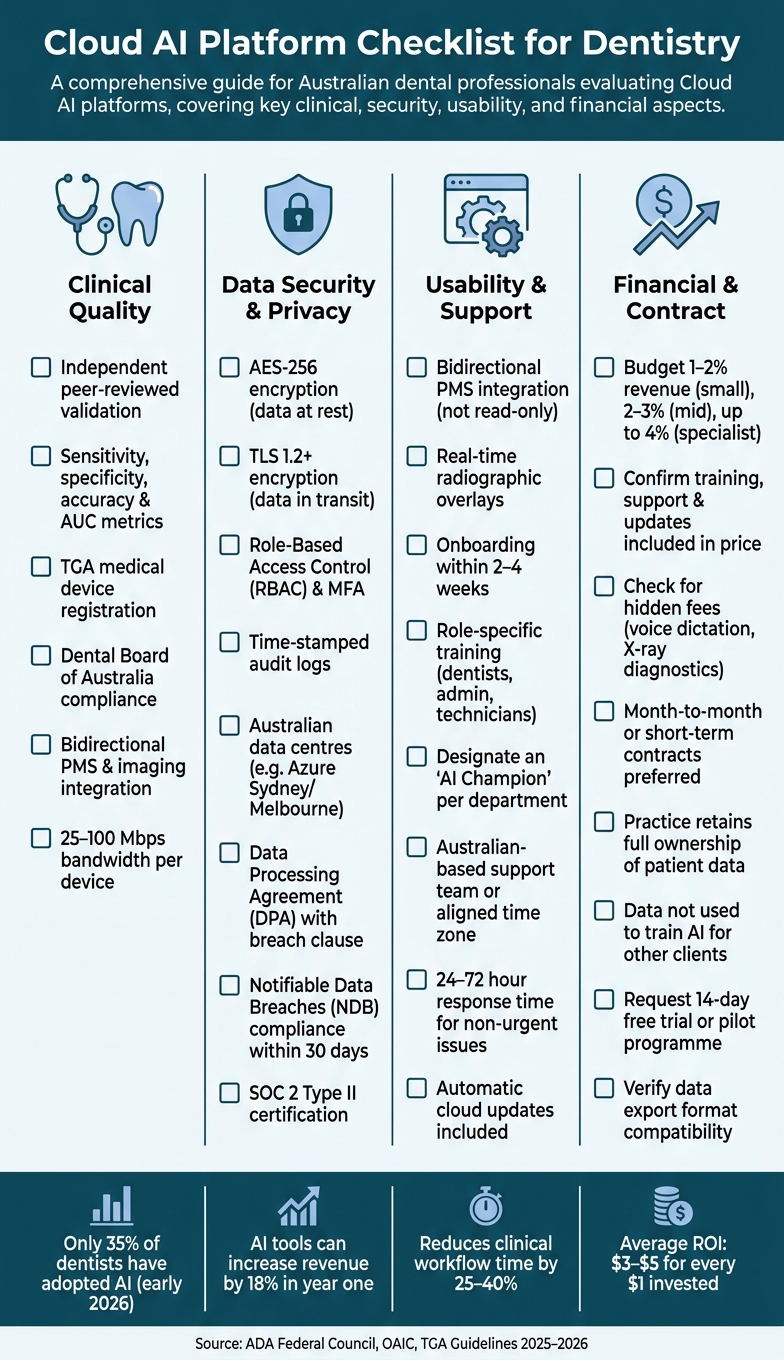
Cloud AI Platform Checklist for Dentistry: Key Evaluation Criteria
Clinical Quality and Compliance Checklist
Clinical Validation and Performance
When evaluating an AI platform, it’s essential to request solid evidence of its performance. Metrics like sensitivity, specificity, accuracy, and AUC are crucial for objectively comparing systems [6]. These figures help you understand how effectively the platform identifies conditions such as caries or bone loss, while also revealing how frequently it generates false positives or misses critical findings.
Look for validation through independent, peer-reviewed studies [2][3]. Be cautious if the only supporting evidence comes from the vendor’s marketing materials – this could be a warning sign. For instance, platforms like Overjet and Pearl have achieved FDA clearance via 510(k) reviews, a process requiring clinical performance data to be submitted to an external regulatory body [2][6]. While FDA clearance is a US-based standard, it reflects a level of external scrutiny that’s worth considering when assessing any AI tool.
Once performance metrics are verified, ensure the platform adheres to all relevant regulatory standards.
Regulatory Compliance
Check whether the platform is registered as a medical device with the TGA [1]. It must also comply with the Dental Board of Australia‘s Dental Records Guidelines and its broader codes, policies, and guidelines [7].
Additionally, confirm in writing that professional ownership of patient records remains intact [7]. The Australian Dental Association (ADA) Federal Council provides clear guidance on this matter:
"Any application of an AI system in dental clinical care must be supervised and managed by a Dental Practitioner and not be actioned autonomously by patients." – ADA Federal Council [4]
It’s also important to ensure the software vendor accepts responsibility for the outputs their system generates:
"Manufacturing companies should assume a level of responsibility for the data and information that is provided by these AI products." – ADA Federal Council [4]
If a vendor refuses to take meaningful accountability for their product’s outputs, it’s a factor that demands careful consideration.
Fit with Clinical Workflows
Even with strong validation and compliance, the platform must fit seamlessly into your daily operations. A tool that excels in a controlled environment but fails to integrate with your existing systems can lead to operational headaches. The critical question is whether the AI integrates directly with your practice management system (PMS) and imaging software, or if staff will need to manually transfer data between systems.
"Integration is the difference between AI that actually saves time and AI that creates new work." – Adrian Lefler, CEO, My Social Practice [5]
Ask vendors if their integration is two-way and request a live demo using your actual PMS and imaging setup [5]. One-way integrations often lead to duplicate data entry, negating potential time savings. Also, verify that your internet connection meets the platform’s requirements – cloud-based imaging and 3D scan workflows typically need 25–100 Mbps per device to operate smoothly [2].
sbb-itb-2be92ed
Eric Giesecke on What AI First Actually Means for Dental Software
Data Security and Privacy Checklist
After completing clinical and regulatory evaluations, it’s critical to focus on securing patient data with robust measures.
Data Protection and Privacy Compliance
Once clinical suitability is confirmed, the next priority should be the protection of patient data. In Australia, any cloud-based AI platform handling patient information must adhere to the Privacy Act 1988 and the Australian Privacy Principles (APPs).
Ensure that your vendor aligns with the guidelines set by the Office of the Australian Information Commissioner (OAIC). Data must only be collected, used, and stored as permitted under these rules. It should never be used to train AI models for other clients or purposes. Verify that the platform implements AES-256 encryption for data at rest and TLS 1.2 or higher for data in transit [8]. Request explicit confirmation from the vendor about these encryption standards.
Additionally, confirm that the vendor provides a Data Processing Agreement (DPA), which includes a clause for breach notifications. Under the Notifiable Data Breaches (NDB) scheme, your practice is required to notify both the OAIC and affected patients of any eligible breach within 30 days [12]. Vendor contracts should stipulate that they notify your practice of any suspected breaches within 24 to 72 hours [5].
Hosting and Data Residency
Compliance with APP 8 requires clear oversight of where patient data is stored and processed. According to APP 8, your practice is legally responsible for any misuse of patient data by an overseas vendor – even if you were unaware that the data was sent offshore [11]. This makes verifying data residency a critical step before signing any contracts.
Choose vendors that use Australian-based data centres, such as Microsoft Azure‘s Australia East (Sydney) or Australia Southeast (Melbourne) regions. Confirm that backups and disaster recovery replicas are also stored within Australia [9]. Be cautious of free or consumer-level AI tools, as they may not meet these standards. The OAIC’s 2025 guidance explicitly warns against entering personal health information into AI tools that lack safeguards to prevent data from being used for model training [11].
"For healthcare practices, data sovereignty isn’t optional." – CloudGeeks [12]
Several Australian-hosted platforms, including Heidi Health and Lyrebird Health, ensure that all AI processing is conducted exclusively within Australian data centres [9][12]. When assessing platforms, ask vendors if they use a "Standard Regional" deployment model, which ensures data is not routed internationally.
Access Control and Audit Trails
Effective access controls act as a crucial barrier against unauthorised data access. At a minimum, platforms should support Role-Based Access Control (RBAC) to ensure that staff only access the information relevant to their roles. For example, receptionists should not access clinical imaging, and clinicians should not view financial records unless necessary. Additionally, Multi-Factor Authentication (MFA) should be enforced across all access points, including VPNs and practice management systems [8][2].
Equally important are time-stamped audit logs that record who accessed patient records, what changes were made, and when. These logs are not only a security best practice but also essential for medico-legal documentation in case of disputes [2]. Look for vendors with voluntary SOC 2 Type II certification, as it indicates a more rigorous and comprehensive evaluation of security measures compared to basic compliance [5].
| Security Measure | Standard | Purpose |
|---|---|---|
| Encryption (at rest) | AES-256 | Protects stored data from server breaches |
| Encryption (in transit) | TLS 1.2+ | Secures data moving between clinic and cloud |
| Access control | RBAC & MFA | Limits access to authorised personnel only |
| Audit logging | Time-stamped logs | Supports security audits and legal defence |
| Data residency | Australian data centres | Meets APP 8 cross-border obligations |
These security measures, when combined with earlier compliance checks, provide a comprehensive framework for protecting patient data.
Usability and Support Checklist
After ensuring data security, the next big step is assessing how well the platform fits into your practice’s daily workflows. Even the most advanced AI tool won’t succeed if it disrupts your team’s efficiency.
Interface and Workflow Design
Make sure the platform offers bidirectional integration with your Practice Management System (PMS). This setup allows patient data to flow seamlessly in both directions, cutting out the need for manual exports, nightly file syncing, or repetitive data entry. As Sajid Ahamed from Dental Practice Insider explains:
"A tool with a native bidirectional integration is worth a premium over a cheaper tool that requires nightly file transfers or manual sync." [14]
Before committing to a vendor, check whether the integration is read-only or if it can also write data back to the PMS. This distinction will reveal how much added effort your team might face.
Look for platforms that include visual aids, such as real-time radiographic overlays. These tools simplify communication by helping clinicians explain findings without relying on technical jargon. Practices that choose user-friendly AI tools often see adoption rates increase by 30–50% [13].
Training and Onboarding
Once integration is sorted, focus on making the transition smooth for your team. Aim to onboard within 2–4 weeks. Be cautious of vendors promoting overly simple "plug-and-play" solutions, as these often come with minimal support.
Training should be tailored to different roles – dentists, administrative staff, and technicians. For instance, VideaHealth has shown how effective onboarding can lead to success, achieving a 95% usage rate among approximately 50,000 clinicians within six months of implementation [10].
A helpful approach is designating an "AI champion" in each department. This person acts as a go-to resource for colleagues, answers questions, and communicates usability concerns to the vendor. This strategy lightens the load for practice managers and speeds up team-wide adoption [13].
Ongoing Support and Updates
After onboarding, consistent support is key to keeping the system running smoothly. Cloud-based platforms should offer automatic updates, ensuring your software stays current without requiring manual downloads or IT involvement. Ask vendors about their product roadmap to gauge their commitment to advancing their dental AI solutions [5].
For Australian practices, check if the vendor aligns with local time zones or has an Australian-based support team. A response time of 24–72 hours for non-urgent issues is generally acceptable [5]. Additionally, access to human account managers – not just automated chatbots – can be invaluable, especially when clinical workflows are affected. Regular performance reviews of the AI system, combined with ongoing staff feedback, can help identify and address potential problems early on [2].
Financial and Practice Impact Checklist
Pricing and Budgeting
When budgeting for a cloud AI platform, it’s important to look beyond the monthly subscription fee. General guidelines suggest allocating 1–2% of annual revenue for small practices, 2–3% for mid-sized ones, and up to 4% for larger or specialist practices [18]. Beyond the base cost, check if training, live support, and software updates are included or if they come with extra fees [15][18]. Some vendors may also charge additional fees for specific tools like voice dictation or X-ray diagnostics, which could significantly increase your monthly expenses.
"X-ray AI isn’t new – but most vendors still price it like it is. We’ve dropped Denti.AI Detect to $49 per month because that’s what it should cost." – Dmitry Tuzoff, Founder & CEO, Denti.AI [16]
Once you’ve accounted for these costs, turn your attention to the contract terms and data ownership policies.
Contract Terms and Data Ownership
Understanding the fine print in contracts is essential to avoid unexpected costs down the line. Before signing, ensure the terms clearly state that your practice retains full ownership of patient data and that it won’t be used to train AI models for other clients [5]. Be cautious of vague assurances like "we anonymise everything", as they may not fully protect your data.
Short-term or month-to-month contracts are generally safer than long-term commitments, especially if the vendor doesn’t offer clear performance guarantees. For example, in early 2026, Heartland Dental faced a class action lawsuit after their AI phone vendor was found recording patient calls without proper disclosure and using the transcripts to train models for competitors [5]. To avoid similar issues, ask for a live demonstration of how your data can be exported and ensure the export format is compatible with other systems you may use in the future [5].
"If they need to lock you in to keep your business, that tells you something." – Adrian Lefler, CEO, My Social Practice [5]
Impact on Clinical Efficiency
Finally, consider how the platform will affect your practice’s day-to-day operations. AI diagnostic tools can increase revenue by 18% within the first year and reduce clinical workflow time by 25–40%. They can also cut repetitive tasks, like appointment reminders and insurance verification, by 30–40% [14][18]. On average, practices see a return of $3–$5 for every $1 invested in AI technology [18].
To see if these benefits align with your practice, request a 14-day free trial or pilot programme. Use this period to measure time saved on documentation, changes in case acceptance rates, and reductions in missed appointments [17][18]. This hands-on experience can provide valuable insights into the platform’s real-world impact on your operations.
Conclusion: Making an Informed Decision
Choosing a cloud AI platform for your dental practice requires careful evaluation across several key areas. This article’s checklist guides you through the critical aspects: clinical quality, data security, usability, and financial compatibility. By addressing these factors systematically, you can find a platform that aligns with your practice’s needs. While no platform will tick every box, the right choice will solve your primary challenges without introducing new ones.
Before making a commitment, consider these essential questions: Does the platform support certified bidirectional PMS integration? What specific data flows are automated? Can the vendor provide references from clients using the same PMS? [14]
It’s also crucial to ensure compliance with the Australian Privacy Act 1988 and APP 8. Avoid vendors that fail to provide a clear, written data processing agreement or detailed explanations of data storage and deletion practices.
"The current AI vendor landscape in dentistry varies widely, with some products proving transformative and others posing security risks. Some are legitimate game-changers. Others are security nightmares wrapped in slick marketing." – Adrian Lefler, CEO, My Social Practice [5]
Look for vendors who prioritise transparency. Indicators of trust include SOC 2 Type II certification, clear contract terms, flexible month-to-month agreements, and the opportunity to pilot the software using real patient data. Start with a pilot program, evaluate its impact on your practice, and expand only if the benefits are clear and measurable.
FAQs
What proof should I ask for to trust an AI tool’s accuracy?
To verify the accuracy and trustworthiness of an AI tool, look for evidence of HIPAA compliance, a signed Business Associate Agreement (BAA), and detailed documentation outlining strong data security protocols. These precautions demonstrate the platform’s dedication to safeguarding sensitive information.
How can I ensure patient data stays in Australia and isn’t used for training?
To keep patient data within Australia and prevent its use for training purposes, it’s essential to confirm that the AI vendor:
- Uses Australian-based servers to store all data.
- Adheres to Australian privacy laws, ensuring compliance with local regulations.
- Provides clear assurances that patient information is neither stored nor used for training without explicit consent.
Make sure to thoroughly review the vendor’s privacy policy and data management practices to ensure they meet these requirements.
What should a dental AI pilot measure to decide if it’s worth it?
A dental AI pilot needs to assess its influence on several key areas: clinical accuracy, workflow efficiency, data security, and patient outcomes. These factors are essential in evaluating whether the platform contributes to better dental care and provides real benefits in practice.
Related Blog Posts
- Real-Time AI in Dental Imaging: What to Know
- Checklist for AI Dental Software
- Video Conferencing Tools for Teledentistry
- Checklist for Securing AI Dental Systems
Important Notice: Any surgical or invasive procedure carries risks. Before proceeding, you should seek a second opinion from an appropriately qualified health practitioner.
Individual results may vary. The information provided in this article is for educational purposes only and does not constitute medical advice.
Checkout Related Blogs



Get in touch with us
For more information, call us now to start feeling better. Or fill the form below to make appointment
The Latest News from Complete Smiles
How to Clean Clear Plastic Retainers
Checklist for Choosing Wearable Dental Devices
Checklist for Choosing Cloud AI Platforms in Dentistry
Complete Smiles Bella VistaAccepts All Major Health Funds, Including