




How Dental Apps Improve Patient Communication

Dental apps are changing the way dental clinics in Australia communicate with patients, making interactions faster, simpler, and more convenient. These tools streamline appointment bookings, reminders, and access to treatment details, reducing the need for phone calls and paperwork. With features like SMS reminders, secure messaging, and patient portals, clinics can focus more on care while patients enjoy better access to information and support.
Here’s what dental apps offer:
- Appointment Management: Patients can book, confirm, or reschedule appointments through SMS, portals, or apps. Automated reminders reduce no-shows and save clinic staff time.
- Secure Messaging: Clinics and patients can exchange non-urgent messages safely, ensuring privacy and quicker responses to queries.
- Digital Forms: Patients can complete medical history updates and consent forms electronically, speeding up check-ins and reducing errors.
- Patient Portals: 24/7 access to schedules, treatment history, and billing details, with some portals offering educational resources to help patients understand their care.
Dental Intelligence 2-Way Patient Communication
Key Features of Dental Communication Apps
Dental communication apps bring together essential tools to simplify interactions between dental clinics and their patients. These platforms are designed to make communication seamless, offering features like automated appointment reminders, secure messaging, digital forms, and patient portals. By integrating with practice management systems, they help clinics organise schedules and patient records more efficiently. Here’s a closer look at how these features work.
Automated Appointment Reminders
One standout feature is the ability to send automated reminders through SMS, email, or even phone calls. These reminders are usually scheduled at key intervals – such as a week or two before, a few days prior, and on the day of the appointment. Patients can confirm or reschedule appointments with just a tap or a quick reply, which significantly reduces missed appointments and lightens the workload for reception staff. Tools like PracticeMojo, Weave, and NexHealth are popular for their multi-channel capabilities and customisable timing. In Australian dental practices, SMS reminders have become an indispensable part of appointment management.
Secure Two-Way Messaging
Secure two-way messaging allows patients to communicate with their dental clinic in real time, making it easier to ask non-urgent questions or receive updates without the hassle of phone tag. Apps like Curve Dental and Lighthouse 360 provide encrypted messaging systems that integrate directly with patient records, ensuring privacy and compliance with strict standards. While this feature is great for follow-ups and general coordination, it’s not intended for emergencies or clinical diagnoses. However, it plays a vital role in strengthening patient engagement and trust.
Digital Forms and Consent
Gone are the days of filling out paper forms in the waiting room. Digital forms let patients complete medical history updates, insurance details, and consent documents electronically – even before stepping into the clinic. Platforms like PracticeDilly, Flex Dental, and NexHealth offer "smart forms" that sync directly with patient records, cutting down on data entry errors and making the check-in process quicker and smoother.
Patient Portals
Patient portals give patients 24/7 access to essential dental information, including appointment schedules, treatment summaries, billing details, and online payment options in AUD. For example, Curve Dental’s portal might include a video library that explains various procedures, helping patients feel more informed about their treatment plans. Meanwhile, platforms like Solutionreach offer features like mobile scheduling and automated recall reminders, making it easy for patients to book appointments or check their account balances. Clinics such as Complete Smiles Bella Vista use portals to provide detailed treatment plans along with payment schedules, giving patients greater clarity and control over their dental care.
How to Implement Dental Apps in Your Practice
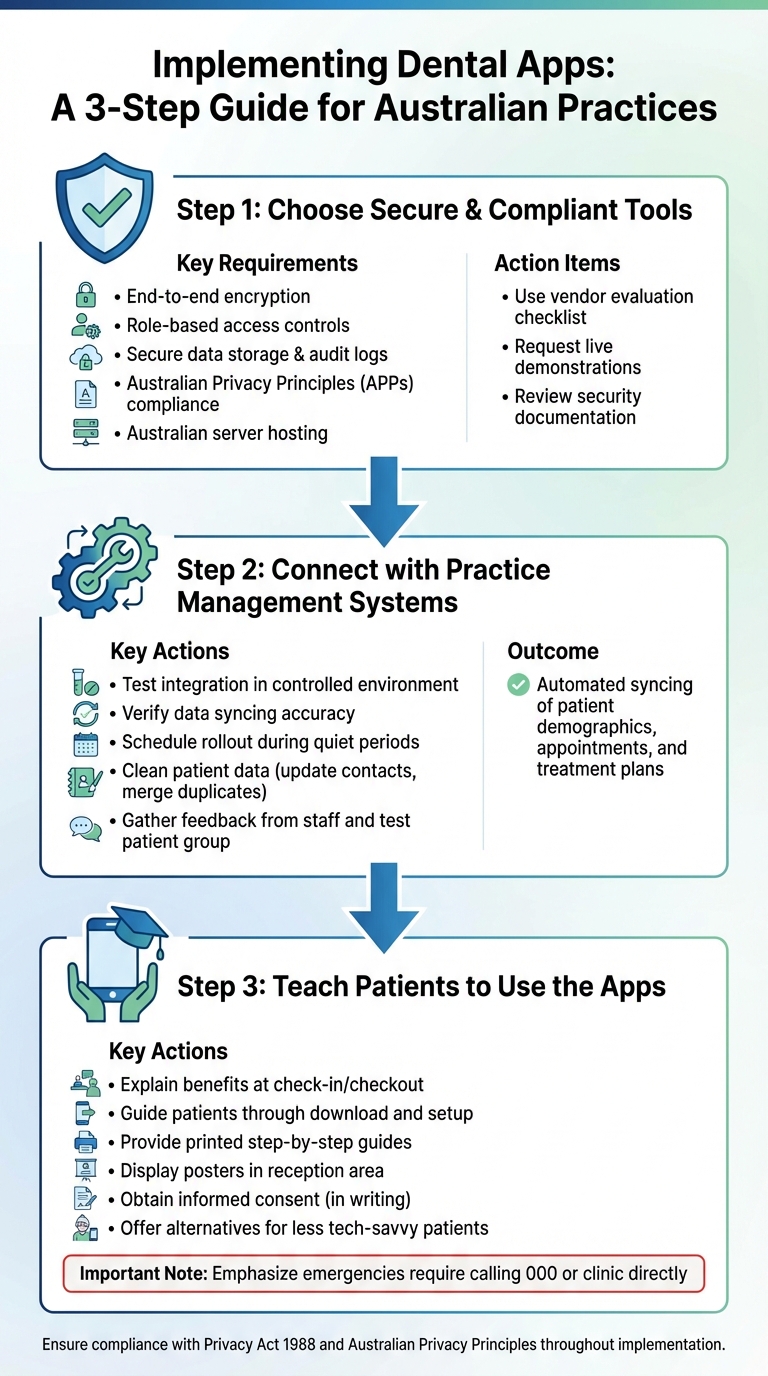
How to Implement Dental Communication Apps in Your Practice: 3-Step Guide
Choosing Secure and Compliant Tools
When introducing a dental communication app, security and privacy should be your top priorities. Look for tools offering end-to-end encryption, role-based access controls, secure data storage, and audit logs that track who accesses information. The app must comply with the Australian Privacy Principles (APPs) under the Privacy Act 1988, ensuring transparent data handling and clear breach notification processes. It’s also wise to choose vendors that host data on Australian servers or in regions with similar health-data protection laws. For sharing sensitive clinical information, secure in-app messaging or patient portals are far safer options than standard SMS or email.
To make an informed choice, use a checklist to evaluate vendors. Focus on features like encryption, user permissions, privacy compliance, local data hosting, integration capabilities, and user-friendliness. Request live demonstrations showcasing practical workflows, such as sending appointment reminders, two-way messaging, or post-operative care instructions. Additionally, ask for documentation like penetration-testing reports, security policies, and agreements that meet Australian legal standards. Implementing these measures not only protects patient data but also builds trust – a critical element for effective communication.
Connecting with Practice Management Systems
For smooth operations, select apps that integrate seamlessly with your practice management software. This ensures patient demographics, appointment details, and treatment plans sync automatically, allowing reminders, recalls, and follow-up messages to pull accurate, real-time information. It also ensures that communication history is recorded in your practice management system (PMS) for thorough documentation.
Before launching the app, work with the vendor to test the integration in a controlled environment. Verify that data syncs correctly and schedule the rollout during a quieter period to minimise disruptions. Conduct a data-cleaning exercise beforehand – update patient contact details, merge duplicate records, and confirm communication preferences. During the initial rollout, gather feedback from reception staff, clinicians, and a small group of patients to fine-tune templates, adjust reminder timing, and refine triage rules. This approach ensures the app enhances efficiency for both staff and patients.
Once the integration is running smoothly, the next step is to introduce the app to your patients.
Teaching Patients to Use the Apps
The success of any new tool depends on how well patients understand and use it. Clearly explain the benefits – fewer phone calls, timely reminders, and easier access to information. Front-desk staff can play a key role by introducing the app during check-in or checkout. They can guide patients through downloading it, setting up notifications, and even sending a test message while still in the clinic. To reinforce this, provide printed step-by-step guides, display posters in the reception area, and follow up with email or SMS invitations.
It’s important to obtain informed consent, ideally in writing. This should outline the use of electronic communication, the types of messages patients can expect (e.g., reminders, treatment updates, billing notices), and any associated risks. Document all consent forms and communications in the patient record. Make sure patients understand that emergencies still require calling 000 or contacting the clinic directly. For those less comfortable with technology, offer alternatives like SMS reminders while continuing traditional methods such as phone calls or paper letters.
Practices like Complete Smiles Bella Vista, which focus on personalised care across a range of treatments, can highlight how these apps enhance – not replace – the one-on-one relationships patients value.
sbb-itb-2be92ed
How Apps Improve Patient Communication
When patients become familiar with using dental apps, the advantages are obvious. These tools are transforming the way clinics and patients interact, making care more accessible, efficient, and responsive.
Simplifying Appointment Management
Dental apps make booking appointments a breeze. Patients can confirm, reschedule, or cancel appointments with just a tap – no need to call during business hours. Automated reminders, sent via SMS, email, or push notifications (based on patient preference), include details formatted for Australian users, such as the date (e.g., 15/06/2026 at 3:30 pm) and any applicable fees in AUD. Platforms like NexHealth, Weave, and Solutionreach even allow patients to click a link to instantly confirm or select a new time, syncing seamlessly with the clinic’s management system [1][2].
For reception staff, this means fewer manual phone calls and less time chasing no-shows, creating a smoother workflow. Patients, on the other hand, enjoy the flexibility of managing their appointments anytime – whether during a lunch break, late at night, or over the weekend – making it easier to balance dental care with work and family commitments. This streamlined process naturally transitions into better follow-up care.
Supporting Follow-Up and Preventive Care
Dental apps keep patients on track with their routine care by sending automated recall reminders for check-ups, hygiene visits, or follow-up treatments. Systems like PracticeDilly and PracticeMojo integrate with clinic software to pull up recall lists and send personalised messages, often including a direct booking link. These reminders encourage patients who may have fallen behind on their care to re-engage [2][3][4]. Over time, this approach helps reduce the number of patients who skip visits, leading to better oral health and fewer emergency situations.
Additionally, apps provide post-treatment instructions and educational resources tailored to individual needs. Platforms such as Curve Dental offer clinics access to libraries of videos and written guides, which can be shared through patient portals. These resources help patients understand procedures, follow after-care instructions, and adopt preventive habits [6][2]. For instance, after a root canal or implant surgery, the app might send reminders about medication schedules, dietary restrictions, or warning signs to monitor – all presented in metric units and language familiar to Australian patients. By delivering this kind of structured follow-up, clinics encourage adherence to care plans and build patient confidence, particularly for those undergoing complex or lengthy treatments.
Enabling Post-Procedure Communication
One of the standout features of dental apps is secure two-way messaging, which is particularly useful for post-procedure care. Patients can ask questions, report symptoms, or share photos after leaving the clinic, while clinicians or staff can respond promptly to provide guidance or determine if an urgent visit is necessary [1][2]. Platforms like Weave and Podium prioritise encrypted and compliant messaging to protect patient privacy while maintaining a friendly and conversational tone [1][2][5].
This level of responsiveness fosters trust and eases patient anxiety. For example, patients can quickly report concerns like post-treatment swelling or issues with aligners, rather than waiting for their next appointment or making an unnecessary trip to the clinic. For practices offering advanced treatments – such as the implants, Invisalign, veneers, and orthodontics provided by Complete Smiles Bella Vista – this kind of support enhances patient comfort, satisfaction, and overall treatment outcomes.
Using Dental Apps Safely and Responsibly
Dental apps can provide many advantages, but it’s essential for clinics to use them carefully. Protecting patient information, maintaining professional standards, and ensuring accessibility for all patients are key to their responsible use.
Protecting Privacy and Confidentiality
Australian dental practices must adhere to the Privacy Act 1988 and the Australian Privacy Principles (APPs), which regulate how personal health information is managed in digital systems [2]. Selecting apps with features like end-to-end encryption, user authentication, and role-based access controls is crucial – these are the same types of protections used across the healthcare sector [1][2]. Avoid using unsecured platforms like standard email or SMS for sensitive clinical details unless they’re properly safeguarded [1][2].
To maintain security, clinics should establish written access-control policies and regularly review staff credentials. When an employee leaves, their access must be revoked immediately [2]. Data should be stored on secure Australian servers, with strict measures like automatic log-outs, device locks, and regular password updates in place. Routine staff training and audits are also necessary to ensure only authorised personnel access patient information [1][2].
All important clinical interactions, such as post-operative concerns or triage advice, should be documented in the main clinical record. This avoids creating separate, incomplete records within the app [2]. Clinics should also obtain explicit patient consent for app-based communication, clearly outlining the types of messages they’ll receive (e.g., appointment reminders, follow-up instructions, or payment notifications) and the channels used (SMS, push notifications, or in-app chat) [1][2]. These preferences and consents should be recorded in the practice management system and reviewed regularly.
Once privacy measures are in place, clinics should focus on setting professional boundaries to ensure digital communication remains safe and effective.
Maintaining Professional Boundaries
In-app or SMS conversations should always reflect the professionalism of clinical communication. Staff should use respectful, clear, and professional language [2]. Clinics can create templates and establish "house rules" that define response times, acceptable topics (like appointment queries or simple post-operative concerns), and guidelines for when patients should book an appointment rather than continuing a digital discussion [1][2]. Non-urgent messages should only be sent during business hours, with automated responses acknowledging messages received after hours and specifying when a clinician will reply [1].
If a patient reports severe symptoms – such as pain, swelling, bleeding, trauma, or systemic issues – staff should stop detailed app discussions and encourage the patient to schedule an urgent appointment or telehealth consultation [2]. Complex matters like treatment planning, delivering sensitive news, obtaining informed consent, or interpreting diagnostic images should always be handled face-to-face or via video consultations to ensure thorough communication and proper documentation [2]. For clinics offering advanced treatments – such as implants, Invisalign, veneers, or orthodontics, like those at Complete Smiles Bella Vista – clear triage protocols can help staff determine when urgent reviews are necessary for pain or complications [1][2].
Meeting Diverse Patient Needs
To provide inclusive care, clinics must adapt their communication methods to meet the diverse needs of their patients.
Offering multiple communication options – such as SMS, email, phone, and patient portals – allows patients to choose what works best for them [1][2]. For older patients or those with limited digital literacy, staff can help set up apps in the clinic, provide printed instructions, or rely on phone reminders while gradually introducing simpler app features like appointment confirmations [2]. Patients from culturally and linguistically diverse backgrounds may benefit from plain English messages, translated materials when available, and the option to involve a trusted contact for communication support.
Patients with visual or motor impairments may require apps compatible with screen readers, large-text modes, and user-friendly interfaces. Alternatives like voice calls should also be available for those who find digital platforms challenging [2]. Gathering communication preferences during the new patient intake process helps clinics personalise their approach from the start. By combining secure messaging, clear protocols, and ongoing staff training, dental practices can use apps to improve patient communication while upholding privacy, professionalism, and clinical safety [1][2].
Conclusion
Dental apps have become an integral part of modern Australian dental practices, offering quick and convenient ways to communicate. These tools strengthen the connection between dental teams and patients, making care easier to access – particularly for busy families and shift workers who may struggle to call during standard hours.
For practices offering a wide range of services – from general dentistry to advanced procedures like implants, Invisalign, and veneers (such as those available at Complete Smiles Bella Vista) – apps can streamline the coordination of complex treatment plans. Features like automated reminders help patients stick to their orthodontic reviews or post-operative appointments, while digital education materials provide clear aftercare instructions for treatments like root canals or teeth whitening. This combination of technology and personalised care enhances both the quality of clinical outcomes and the patient experience.
That said, the benefits of dental apps are only fully realised when they are used responsibly. Secure protocols, proper patient consent, and clear professional boundaries are essential to ensure these tools are both effective and ethical.
To ensure accessibility for all patients, practices should also offer alternative communication methods. By choosing compliant technologies, integrating them with practice management systems, and providing training for both staff and patients, dental teams can deliver care that aligns with Australian standards and puts patients first.
Starting with simple features like SMS reminders and digital forms, dental apps can significantly improve patient satisfaction, loyalty, and clinical outcomes. They also reduce the workload on front-desk teams. When integrated thoughtfully and responsibly, these technologies help practices maintain a patient-focused approach that meets the expectations of today’s healthcare environment.
FAQs
How do dental apps protect patient privacy and keep data secure?
Dental apps are designed with patient privacy and data security at their core. They use advanced encryption techniques to protect sensitive information both when it’s being transmitted and when it’s stored. On top of that, secure login options – like multi-factor authentication – help keep unauthorised users out.
These apps also adhere to strict regulations, such as the Australian Privacy Act, to ensure patient data is managed responsibly. Regular security audits and restricted access, limited only to authorised personnel, add another layer of protection. This approach helps clinics and patients feel confident that their information is in safe hands.
What should I do if I have a dental emergency and use a dental app?
If you’re dealing with a dental emergency, your dental app can be a lifesaver. Use it to quickly reach your clinic through its messaging or emergency contact options. For severe cases or situations needing urgent attention, head straight to the nearest healthcare facility or emergency department. Your safety comes first, so don’t hesitate to seek professional help when it’s required.
How can dental clinics encourage patients to start using dental apps?
Dental clinics can encourage patients to start using dental apps by providing clear, step-by-step instructions on how to download and navigate them. Showing off handy features like appointment reminders and secure messaging tools during visits can help patients see how these apps make life easier. Clinics could even offer hands-on help in person to ensure patients feel comfortable and confident with the app.
Highlighting the perks – like quicker communication, easy access to dental records, and smoother appointment scheduling – can make the idea even more appealing. Plus, an app that’s simple to use and updated regularly will keep patients engaged and make it a go-to tool for their dental care.
Related Blog Posts
- How Patient Portals Improve Dental Care
- How Automated Reminders Reduce Missed Appointments
- AI in Dentistry: Benefits of Personalised Oral Health Insights
- Patient-Reported Outcomes in Digital Dentistry
Important Notice: Any surgical or invasive procedure carries risks. Before proceeding, you should seek a second opinion from an appropriately qualified health practitioner.
Individual results may vary. The information provided in this article is for educational purposes only and does not constitute medical advice.
Checkout Related Blogs



Get in touch with us
For more information, call us now to start feeling better. Or fill the form below to make appointment
The Latest News from Complete Smiles
How to Clean Clear Plastic Retainers
Checklist for Choosing Wearable Dental Devices
Checklist for Choosing Cloud AI Platforms in Dentistry
Complete Smiles Bella VistaAccepts All Major Health Funds, Including